
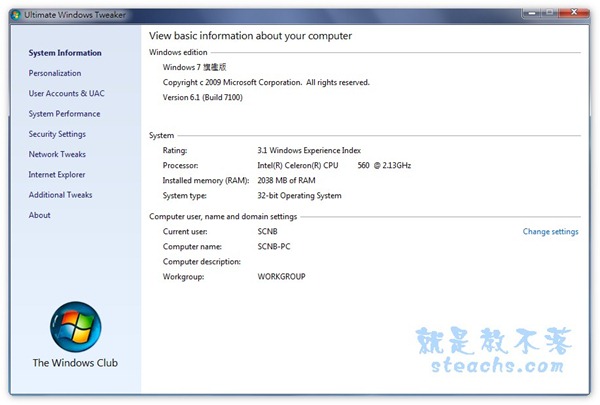
官方網站:http://www.thewindowsclub.com/ 軟體版本:2.0(免費綠色軟體) 軟體下載:http://www.thewindowsclub.com/downloads/UWTv2.0.zip 支援系統:Windows Vista、7 (32位元及64位元皆可)以下為丫湯自行翻譯的中文對照,有些部份因為不知道怎麼翻比較順暢,不過大部份我已經盡量翻譯的比較口語化了,如果在翻譯上有什麼建議歡迎留言,丫湯會依比較好的翻譯作修正,有興趣的往下研究一下吧~ 一、System Information:系統資訊
 二、Personalization:個性化設置
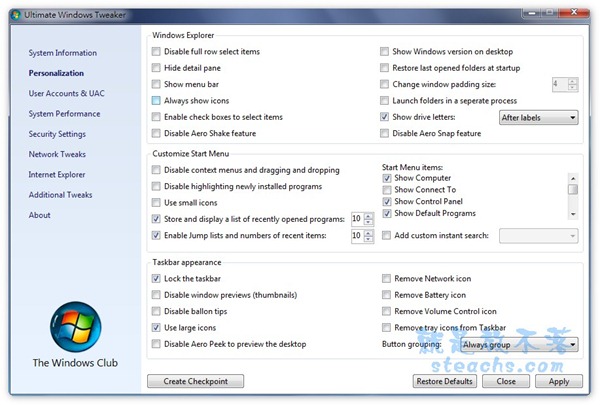
- Disable full row select items:停用整列選擇項目
- Hide detail pane:隱藏詳細訊息面板
- Show menu bar:顯示目錄欄
- Always show icons:永遠顯示圖示
- Enable check boxex to select items:啟用複選框選擇項目
- Disable Aero Shake feature:停用Aero防震功能
- Show Windows version on desktop:在桌面顯示Windows版本
- Restore last opened folders at startup:開機時開啟最後開啟的資料夾
- Change window padding size:改變視窗大小
- Launch folders a seperate process:執行資料夾獨立程序
- Show drive letters:顯示裝置標籤
- Disable Aero Snap feature:停用Aero補捉功能
- Disable context menus and dragging and dropping:停用右鍵目錄及拖曳
- Disable highlighting newly installed programs:停用高亮最新安裝的程式
- Use small icons:使用小圖示
- Store and display a list of recently opened programs:保留及顯示最近開啟的程式列表
- Enable Jump lists and numbers of recent items:啟用最新項目的跳轉列表及數字
- Show Computer:顯示我的電腦
- Show Connect To:顯示連結
- Show Control Panel:顯示控制面板
- Show Default Programs:顯示預設程式
- Add custom instant search:加入自定義搜尋列
- Lock the taskbar:鎖定工作列
- Disable window previews(thumbnails):停用視窗預覽(縮圖)
- Disable ballon tips:停用汽球提示
- Use large icons:使用大圖示
- Disable Aero Peek to preview the desktop:
- Remove Network icon:移除網路圖示
- Remove Battery icon:移除電源圖示
- Remove Volume Control icon:移除音量控制圖示
- Remove tray icons from Taskbar:從工作列移除系統圖示
- Button grouping:按鈕群組
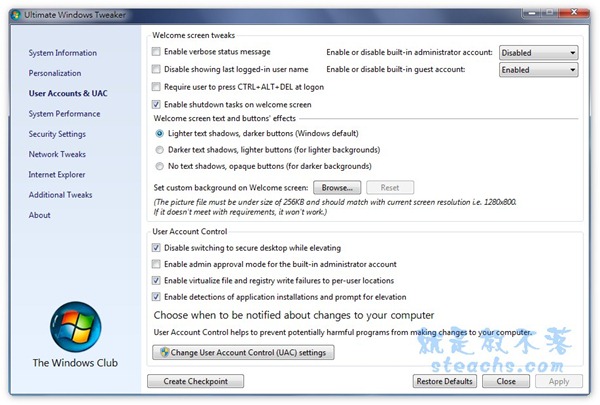 1.Welcome Screen tweaks:歡迎畫面設置
- Enable verbose status message:啟用詳細訊息
- Disable showing last logged-in user name:停用顯示最後登入帳戶
- Require user to press CTRL+ALT+DEL at logon:帳戶登入需按CTRL+ALT+DEL
- Enable shutdown tasks on welcome screen:在歡迎畫面顯示關按鈕
- Lighter text shadows,darker buttons(Windows default):淺色文字陰影、深色按鈕(預設)
- Darker text shadows,lighter buttons(for lighter backgrounds):深色文字陰影、淺色按鈕(適合較淺色系的背景)
- No text shadows,opaque buttons(for darker backgrounds):沒有文字陰影、不透明的按鈕(適合較深色系的背景)
- Disable switching to sevure desktop while elevating:執行時禁止切換到安全桌面
- Enable admin approval mode for the built-in adminstrator account:啟用管理員帳戶允許模式
- Enable virtualize file and registry write failures to per-user locations:啟用虛擬檔案及註冊寫入失敗記錄
- Enable detections of application installations and prompt for elevation:啟用帳戶檢測機制及允許提示
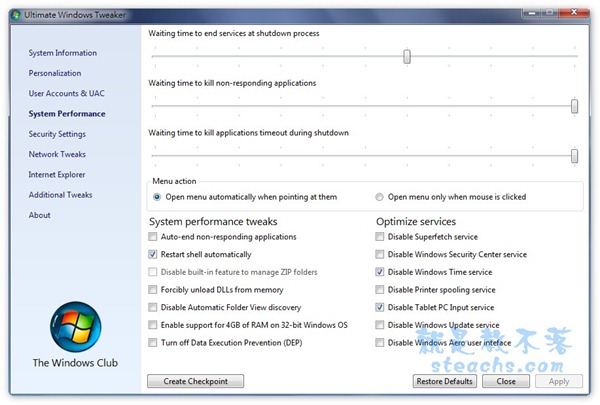 1.Waiting time to end service at shutdown process:關機時關閉服務的等待時間
2.Waiting time to kill non-responding applications:關閉無回應程式的等待時間
3.Waiting time to kill applications timeout during shutdown:關機時關閉程式逾時等待時間
4.Menu action:目錄動作
1.Waiting time to end service at shutdown process:關機時關閉服務的等待時間
2.Waiting time to kill non-responding applications:關閉無回應程式的等待時間
3.Waiting time to kill applications timeout during shutdown:關機時關閉程式逾時等待時間
4.Menu action:目錄動作
- Open menu automatically when pointing at them:當滑鼠指向目錄自動開啟
- Open menu only when mouse is clicked:當滑鼠點擊目錄開啟
- Auto-end non-responding applications:自動關閉無回應程式
- Restart shell automatically:自動重啟介面
- Disable built-in feature to mange ZIP folders:停用內建的ZIP管理程式
- Forcibly unload DLLs from memory:從內存強制卸載DLLs
- Disable Automatic Folder View discovery:
- Enable support for 4GB of RAM on 32bit Windows OS:啟用32位元OS支援4G以上記憶體
- Turn off Data Execution Prevention(DEP):關閉資料執行防止
- Disable Superfetch sevice:停用Superfetch
- Disable Windows Security Center service:停用Windows安全中心
- Disable Windwos Time service:停用Windows Time服務
- Disable Printer spooling service:停用印表機控制台
- Disable Tablet PC Input service:停用Tablet PC服務
- Disable Windows Update service:停用Windows更新服務
- Disable Windows Aero user interface:停用Windows Aero使用者介面
本篇文章共分為二個部份,請點選以下連結繼續觀看: 一、Ultimate Windows Tweaker系統調整工具 PART I (本頁面) 二、Ultimate Windows Tweaker系統調整工具 PART II五、Security Settings:安全設置
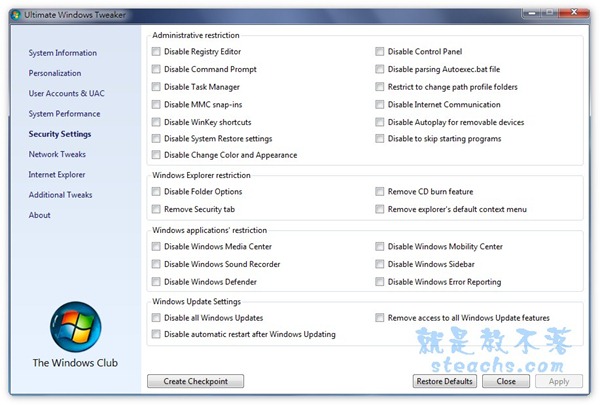 1.Administrative restriction:管理設定
- Disable Registry Editor:停用註冊表編輯器
- Disable Command Prompt:停用CMD命令
- Disable Task Manager:停用程序管理器
- Disable MMC snap-ins:停用MMC嵌入式管理
- Disable WinKey shortcuts:停用Windows鍵
- Disable System Restore settings:停用系統還原設定
- Disable Change Color and Appearance:停用顏色設定及個性化設定
- Diable Control Panel:停用控制面板
- Disable parsing Autoexec.bat file:停用執行 Autoexec.bat檔案
- Restrict to change path profile folders:設定改變記錄資料夾路徑
- Disable Internet Communication:停用網路連線
- Disable Autoplay for removeable devices:停用自動播放功能
- Disable to skip starting programs:停用開機自動執行程式
- Disable Folder Options:停用資料夾設定
- Remove Security tab:移除安全中心
- Remove CD burn feature:移除CD燒錄功能
- Remove explorer’s default context menu:移除explorer預設的彈出目錄
- Disable Windows Media Center:停用媒體中心
- Disable Windows Sound Recorder:停用錄音功能
- Disable Windows Defender:停用反間碟工具
- Disable Windows Mobility Center:停用行動作業中心
- Disable Windows Sidebar:停用顯示側邊欄
- Disable Windows Error Repoting:停用錯誤回報
- Disable all Windows Updates:停用全部Windows更新
- Disable automatic restart after Windows Updating:停用更新自動重開機
- Remove access to all Windows Update features:移除Windows更新功能
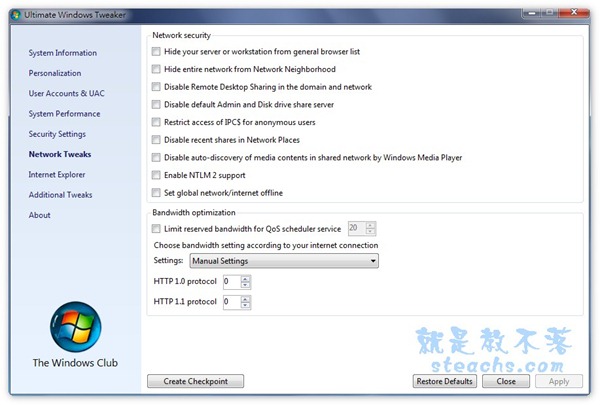 1.Network security:網路安全
- Hide your server or workstation from general browser list:隱藏你的伺服器及工作站在一般瀏覽器列表
- Hide entire network from Network Neighborhood:隱藏網路芳鄰
- Disable Remote Desktop Sharing in the domain and network:停用網域及網路桌面共享
- Disable default Admin and Disk Drive share server:停用預設管理及磁碟共用伺服
- Restrict access of IPC$ for anonymous users:禁止匿名IPC$連接
- Disable recent shares in Networdk Places:停用顯示最新共享在網路位置
- Disable auto-discovery of media contents in shared network by Windows Media Player:停用Windows Media Player的自動共用媒體
- Enable NTLM2 support:啟用支援NTLM2
- Set global network/internet offline:設定網路離線
- Limit reserved bandwidth for QoS scheduler service:限制QoS數據服務的保留頻寬
- Choose bandwidth setting according to your internet connection Settings:選最適合的網路連線的頻寬設置
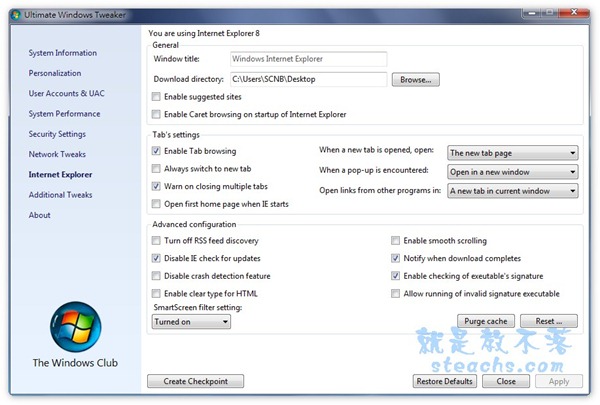 1.General:一般設定
- Windows title:Windows 標籤
- Download directory:預設下載目錄
- Enable suggested sites:啟用建議網站功能
- Enable Caret browsing on startup of Internet Explorer:當IE開啟時啟用插入瀏覽
- Enable Tab browsing:啟用標籤分頁
- Always switch to new tab:永遠切換在新分頁
- Warn on closing multiple tabs:關閉多標籤分頁顯示提醒
- Open first home page when IE sarts:啟動IE時開啟首頁
- When a new tab is opened,open:當建立新分頁時,開啟
- When pop-up is encountered:當新開視窗時
- Open links from other programs in:當其它程式開啟連結時
- Turn off RSS feed discovery:關閉RSS顯示
- Disable IE check for updates:停用IE自動檢查更新
- Disable crash detction feature:
- Enable clear type for HTML:在網頁中啟用clear字型
- SmartScreen filter setting:智能視窗過濾器設定
- Enable smooth scrolling:開啟均速滾動
- Notify when download completes:完成下載提示
- Enable checking of exeutable’s signature:啟用檢查執行檔簽章
- Allow running of invalid signature executable:允運執行未簽章執行檔
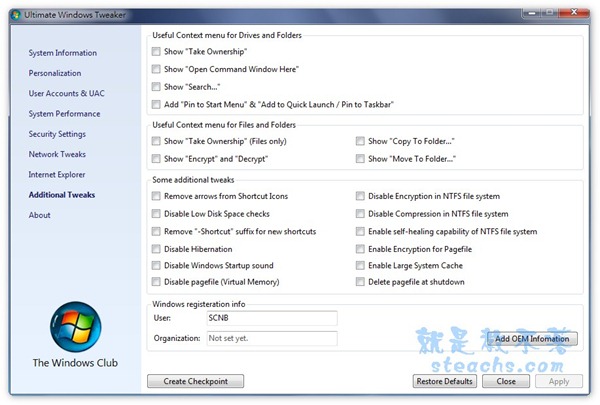 1.Useful Context menu for Drives and Folders:磁碟及資料夾右鍵目錄
- Show “Take Ownership”:顯示”取得所有權”
- Show “Open Command Windows Here”:顯示”執行CMD”
- Show “Search….:顯示”搜尋”
- Add “Pin to Start Menu” & “Add to Quick Launch / Pin to Taskbar”:在工作列加入”加入到開始功能表”及”加入到工作列”
- Show “Take Ownership”(Files only):右鍵顯示(僅檔案)
- Show “Encrypt” and “Decrypt”:右鍵顯示加密及解密
- Show “Copy To Folder..”:右鍵顯示複製到資料夾
- Show “Move To Folder..”:右鍵顯示移動到資料夾
- Remove arrows from Shortcut Icons:移除捷徑箭頭
- Disable Low Disk Space checks:停用硬碟空間不足檢查
- Remove”-Shortcut” suffix for new shortcuts:移除捷徑方式後綴新的捷徑方式
- Disable Hibernation:停用休眠功能
- Disable Windows Startup sound:停用Windows開機音效
- Disable pagefile(Virtual Memory):停用分頁(虛擬記憶體)
- Disable Encryption in NTFS files system:停用NTFS格式檔案加密
- Disable Compression in NTFS file system:停用NTFS格式檔案壓縮
- Enable self-healing capability of NTFS file system:啟用NTSF自動修復
- Enable Encryption for Pagefile:啟動分頁檔加密
- Enable Large System Cache:啟動大型系統快取
- Delete pagefile at shutdown:關機時刪除分頁檔
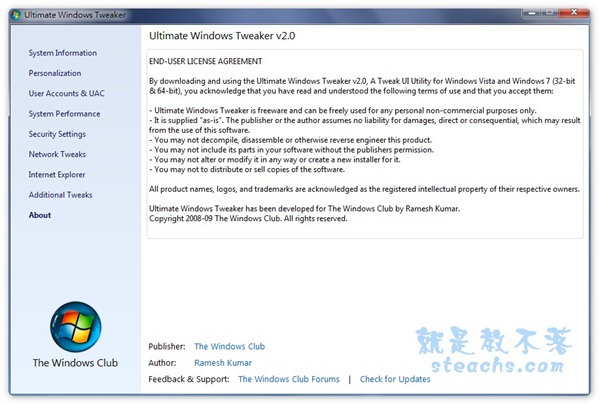
本篇文章共分為二個部份,請點選以下連結繼續觀看: 一、Ultimate Windows Tweaker系統調整工具 PART I 二、Ultimate Windows Tweaker系統調整工具 PART II(本頁面)